Home › Help › Notifications: bell, history and settings
Notifications: bell, history and settings
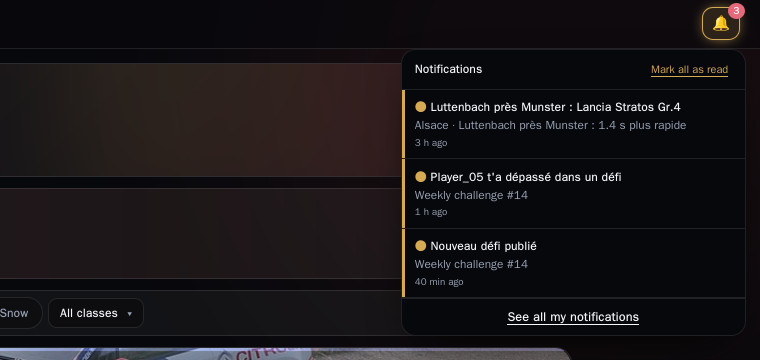
The bell warns you on the site when someone takes a place from you or a challenge concerns you.
Everything is on by default and you choose what you receive. Nothing goes through Discord: that's a bonus, not a requirement.
1. What triggers a notification
- Someone takes your 1st place on a stage: with the same car, otherwise in your class, otherwise overall. One click opens the stage leaderboard on that driver's row.
- A driver passes you in a challenge you joined.
- A new challenge is published.
If several are taken at once (a driver's first sync), you get a single line: « 5 stages ».
2. The bell and the « My notifications » page
- The bell (top of the page) only shows unread notifications. Clicking one marks it read and removes it from the bell.
- See all my notifications, at the bottom of the bell, opens the page with the full history: Unread filter, Mark all as read, ✕ to delete one notification, Delete read ones.
3. How long they stay
- An unread notification disappears 14 days after you receive it.
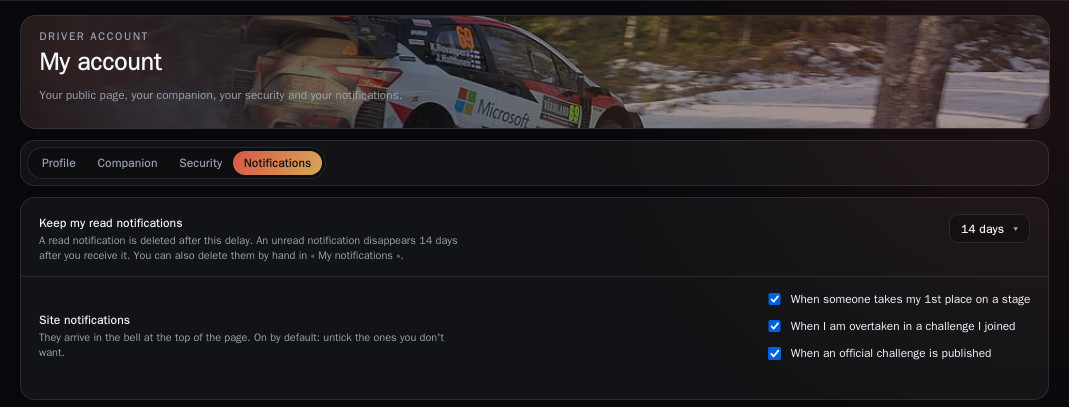
- A read notification disappears after the delay you choose in My account › Notifications › Keep my read notifications: 1, 7, 14 (default) or 30 days.
In the same tab, you tick or untick the types of notifications you want to receive.
Good to know
- A missed notification can be found on the My notifications page, as long as its delay hasn't passed.
- A dot on What's new, in the menu, means a new version of the site is out; it goes away when you open the page.